LLMTheBox - Using LLMs to learn from writeups
This project is open source and the code can be found here: LLMTheBox
Why did I make this #
In part I wanted to play around with embeddings and in part because I enjoy revisiting certain HTB boxes.
I wanted to explore how accurage RAG via embeddings can get, especially with a huge volume of data - about 45k lines of writeups. I knew the theory, but I wanted the practice too, especially because I really think that RAG is what truly unlocks the power of LLMs, as it boosts both accuracy and can act as long term memory. Let’s get into how it works.
The Data #
I relied entirely on the amazing HTB writeups written by 0xdf at https://0xdf.gitlab.io/. He has writeups for every single box, including sherlocks and other non box related blog posts. To extract only the links that actually contained box writeups, I wrote a simple python scrapper:
import requests
import re
from bs4 import BeautifulSoup

def scrape_links_and_save():
    # Hardcoded URL of the webpage to scrape
    url = 'https://0xdf.gitlab.io'  # Replace with the actual URL
    # Hardcoded output file path
    output_file = 'data/htb_links.txt'

    # Send a GET request to the webpage
    response = requests.get(url)
    links_list = []
    complete_links_list = []

    # Check if the request was successful
    if response.status_code == 200:
        # Parse the content of the request with BeautifulSoup
        soup = BeautifulSoup(response.content, 'html.parser')

        # Find all 'a' tags with the class 'post-link'
        links = soup.find_all('a', class_='post-link')

        # Extract the href attribute of each link
        for link in links:
            href = link.get('href')
            if href and re.search(r'/\d{4}/\d{2}/\d{2}/htb-[^/]+\.html$', href):
                links_list.append(href)
    else:
        print(f'Failed to retrieve the webpage. Status code: {response.status_code}')

    for link in links_list:
        link = url + link
        complete_links_list.append(link)

    with open(output_file, 'w') as f:
        for link in complete_links_list:
            if "sherlock" not in link.lower():  # Use .lower() to make the check case-insensitive
                f.write(f"{link}\n")

#scrape_links_and_save()
This short script will extract the full links just for the actual writeups and save them to a .txt file, which can now be parsed.
Parsing the Data #
Thankfully, 0xdf writes expectional blog posts that follow the same format. I wrote a parser that extracts the box difficutly, the nmap output and then each of the “Shell as X” or “Auth as Y” and other important sections that are relevant in the writeup. Essentially, everything that isn’t a detailed nmap out, feroxbuster output, or pictures.
from bs4 import BeautifulSoup
import requests
import re

def extract_htb_data():
    input_file = 'data/htb_links.txt'
    output_file = "data/htbtext.txt"

    with open(input_file, 'r') as file:
        urls = file.read().splitlines()

    with open(output_file, "w", encoding="utf-8") as file:
        for url in urls:
            # Send a GET request to the URL
            response = requests.get(url)

            # Replace the specific phrase in the HTML content
            cleaned_content = response.text.replace("CTF solutions, malware analysis, home lab development", "")

            # Parse the cleaned HTML content
            soup = BeautifulSoup(cleaned_content, 'html.parser')

            rows = soup.find_all('tr')

            ####################
            ##Difficulty rating#
            ####################
            file.write("Difficulty Rating:" + "\n")
            # Iterating through the rows and extracting the text
            for row in rows:
                cells = row.find_all('td')
                if len(cells) == 2:
                    # Check if the first cell contains a <picture> element
                    if cells[0].find('picture') is None:
                        key = cells[0].get_text(strip=True)
                        if key not in ["Rated Difficulty", "Radar Graph", "Retire Date", "Creator"]:
                            value = cells[1].get_text(strip=True)
                            print(f"{key} : {value}")
                            file.write(f"{key} : {value}" + "\n")

            #################
            #####Nmap Text###
            #################
            file.write("Nmap scan:" + "\n")
            pre_tag = soup.find('pre', class_='highlight')

            # If the pre_tag is found, process it
            if pre_tag:
                # Get the text content of the <pre> tag
                pre_text = pre_tag.get_text()

                # Define the start and end patterns
                start_pattern = re.compile(r'Nmap scan report for.*')
                end_pattern = re.compile(r'Nmap done.*')

                # Search for the start and end patterns
                start_match = start_pattern.search(pre_text)
                end_match = end_pattern.search(pre_text)

                # Extract the text between the start and end matches
                if start_match and end_match:
                    start_index = start_match.end()
                    end_index = end_match.start()
                    nmap_output = pre_text[start_index:end_index].strip()
                    print(nmap_output)
                    file.write(nmap_output + "\n")
                else:
                    print("Patterns not found in the text.")
            else:
                print("No <pre> tag with the specified class found.")

            print('##############################################################')

            #################
            #####Paragraphs between Headers with "shell-as" in ID###
            #################

            # Dictionary to store content by header
            content_by_header = {}

            # Variable to keep track of the current header
            current_header = None

            # Define the ID patterns to match
            patterns = ['recon', 'shell-as-', 'auth-as-', 'rce-as-']

            # Function to check if an ID matches any of the patterns
            def id_matches(id):
                return any(id.startswith(pattern) for pattern in patterns)

            # Iterate over all elements in the soup
            for element in soup.find_all(['h2', 'h3', 'h4', 'h5', 'h6', 'p']):
                # Check if the element is a header and its ID matches any of the patterns
                if element.name in ['h2', 'h3', 'h4', 'h5', 'h6'] and id_matches(element.get('id', '')):
                    current_header = element.get_text()
                    content_by_header[current_header] = []
                # If the element is a paragraph and we have a current header
                elif element.name == 'p' and current_header:
                    content_by_header[current_header].append(element.get_text())

            # Print the extracted contents
            for header, paragraphs in content_by_header.items():
                print(f"Category: {header}")
                file.write(f"Category: {header}\n")
                for paragraph in paragraphs:
                    if "Click for full size image" not in paragraph:
                        print(f"{paragraph}")
                        file.write(f"{paragraph}\n")
                file.write("\n")
                print("\n")

#extract_htb_data()
This script is a bit messier because of the way I wanted the data structured, but it works out great. Minor caveat is that some of 0xdf’s really old writeups do not quite follow his more recent format so some data got lost. Turns out that you can improve the quality of the answers you get considerably by using well structured data!
Building the chroma database #
I picked chroma because it’s fast, opensource, and I can store it locally. Probably not the most scalable solution, but it was easy to learn and set up using langchains. The code isn’t too complicated and more or less follows a template. I used OpenAI Embeddings with a TextLoader function to tokenize the writeups.
from langchain.vectorstores import Chroma
from langchain_community.document_loaders import TextLoader
from langchain_community.embeddings import OpenAIEmbeddings

def initialize_chroma_db(file_path, persist_directory, collection_name):
    # Load a text document and split it into sections
    loader = TextLoader(file_path, encoding='cp437')
    docs = loader.load_and_split()

    # Initialize the OpenAI embeddings
    embeddings = OpenAIEmbeddings()

    # Load the Chroma database from disk or create a new one if it doesn't exist
    chroma_db = Chroma(persist_directory=persist_directory,
                       embedding_function=embeddings,
                       collection_name=collection_name)

    # Get the collection from the Chroma database
    collection = chroma_db.get()

    # If the collection is empty, create a new one
    if len(collection['ids']) == 0:
        # Create a new Chroma database from the documents
        chroma_db = Chroma.from_documents(
            documents=docs,
            embedding=embeddings,
            persist_directory=persist_directory,
            collection_name=collection_name
        )

        # Save the Chroma database to disk
        chroma_db.persist()

    return chroma_db

# Example of how to call the function
# chroma_db = initialize_chroma_db("data/htbtext_short.txt", "data", "htb_small_db")
This creates a persistent DB that can be accessed later. Since my source data doesn’t change much, there was no reason to keep an ephemeral one.
The query function #
Finally, the real meat of this weekend project, the main script that calls all the other ones and actually initializes the database into an OpneAI call. Thankfully, it’s also quite short, even though a tad overengineered - I got carried away with some TDD ideas!
# langchain_ask.py

import os
from langchain.chains import RetrievalQA
from langchain.vectorstores import Chroma
from langchain_community.chat_models import ChatOpenAI
from langchain.embeddings.openai import OpenAIEmbeddings
from createchroma import initialize_chroma_db
from scraper import scrape_links_and_save
from download_page_content import extract_htb_data
import warnings  # Import the warnings module

# Suppress all warnings
warnings.filterwarnings("ignore")


def initialize_chat_model(model_name: str = "gpt-4-turbo", temperature: float = 0.8):
    return ChatOpenAI(model_name=model_name, temperature=temperature)


def initialize_embeddings():
    return OpenAIEmbeddings()

def load_chroma_db(persist_directory: str = "data", collection_name: str = "htb_small_db"):

    embeddings = initialize_embeddings()
    return Chroma(persist_directory=persist_directory,
                  embedding_function=embeddings,
                  collection_name=collection_name)


def get_user_query():
    return input("Please enter your query: ")


def execute_query(chroma_db, llm, query: str):

    tagged_docs = chroma_db.get(where={"tag": "htb_small"})

    if tagged_docs:
        chain = RetrievalQA.from_chain_type(llm=llm,
                                            chain_type="stuff",
                                            retriever=chroma_db.as_retriever())
        response = chain(query)
        return response['result']
    else:
        return "No documents found in the collection."


def check_data_folder(folder_path: str = "data") -> bool:

    if os.path.exists(folder_path) and os.listdir(folder_path):
        return True
    return False


def main():

    if not check_data_folder():
        print("Data folder is empty")
        print("Generating links to scrape...")
        scrape_links_and_save()
        print("Downloading page contents...")
        extract_htb_data()
        print("Creating DB...")
        chroma_db = initialize_chroma_db("data/htbtext.txt", "data", "htb_small_db")
        print("Chroma DB created successfully.")


    llm = initialize_chat_model()
    chroma_db = load_chroma_db()
    user_query = get_user_query()
    query = "Answer questions based on the document you have received. " + user_query


    response = execute_query(chroma_db, llm, query)
    print(response)


if __name__ == "__main__":
    main()
The first time the script is execture, it will automatically create the chroma DB and download the files required to build it, which can take a few minutes, although the actual sizes of both the writeups file and the chromaDB are quite small at 50-60 MBs.
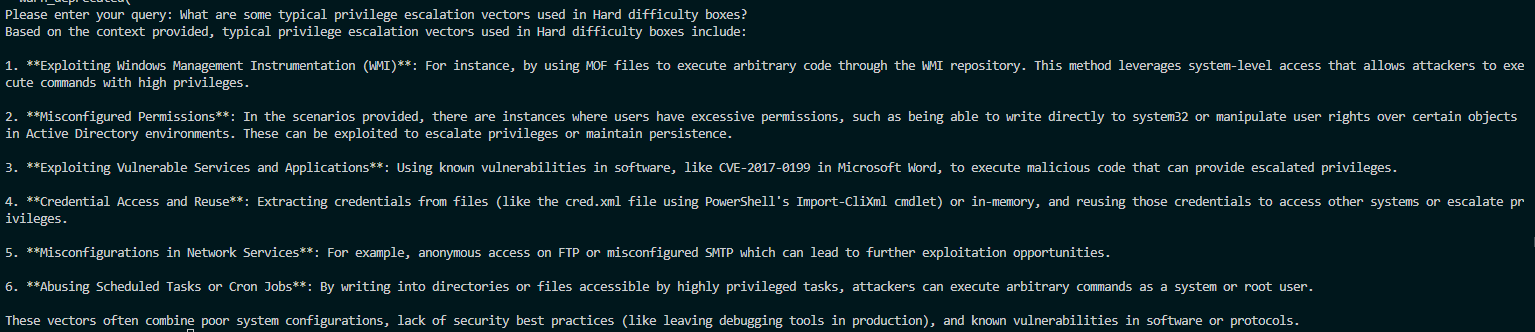
Once everything is set up, the script can be executed and will ask for user input. I’ve found it very cooperative even when it came to sensitive queries, and below is just a mild example:
Hooray!
Applications #
Besides the tinkering aspect of this and exploring LLM libraries and technologies, I think this has some use for infosec people too. It can be used as a creativity tool when you are stuck on a pentest, and I think it can be especially useful to people trying to get into the field that are learning and practicing HackTheBox and similar platforms. With something like this little tool, they are able to better query previous writeups and see what kind of challenges they can expect.
I am an optimist when it comes to LLMs, and I am looking forward to incorporating the lessons learned in this project into a larger one in the near future! I am thinking about creating an assistant that’s actually useful and non intrusive for high achiever.
In the meantime, gotta keep learning.